Preprocessing#
Data preprocessing has a significant impact on the quality of the reconstructed volume in slice-to-volume reconstruciton. The NeSVoR toolkit provides the following preprocessing steps:
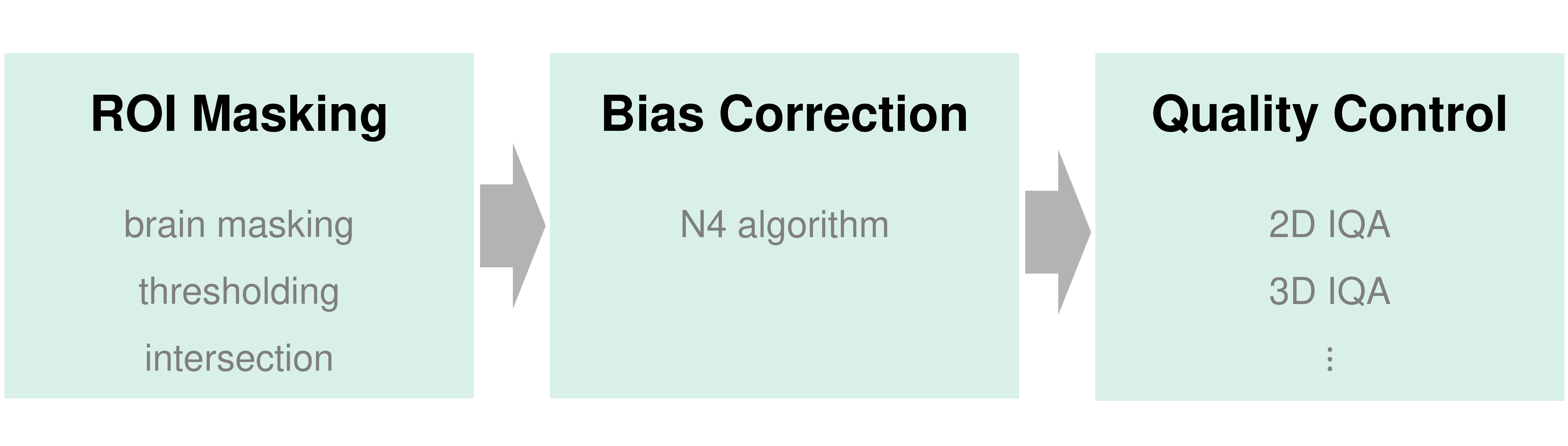
Preprocessing in NeSVoR toolkit
The preprocessing can be performed by using a standalone command
(i.e., segment-stack, correct-bias-field,
and assess). They can also be integrated into the reconstruction pipeline (i.e.,
reconstruct and svr) by setting the corresponding flags.
Brain masking#
We integrate a deep learning based fetal brain segmentation model (MONAIfbs)
into our pipeline to extract the fetal brain ROI from each input image.
The segment-stack command generates brain mask for each input stack as follows.
nesvor segment-stack \
    --input-stacks stack-1.nii.gz ... stack-N.nii.gz \
    --output-stack-masks mask-1.nii.gz ... mask-N.nii.gz \
You may also perform brain segmentation in the reconstruct command by setting
--segmentation.
Bias field correction#
We also provide a wrapper of
the N4 algorithm in SimpleITK
for bias field correction.
The correct-bias-field
command correct the bias field in each input stack and output the corrected stacks.
nesvor correct-bias-field \
    --input-stacks stack-1.nii.gz ... stack-N.nii.gz \
    --stack-masks mask-1.nii.gz ... mask-N.nii.gz \
    --output-corrected-stacks corrected-stack-1.nii.gz ... corrected-stack-N.nii.gz
You may perform bias field correction in the reconstruct
command by setting --bias-field-correction.
Stack quality assessment#
The assess command evalutes the image quality / motion of input stacks.
This information can be used to find a template stack with the best quality or filter out low-quality data.
An example is as follows.
nesvor assess \
    --input-stacks stack-1.nii.gz ... stack-N.nii.gz \
    --stack-masks mask-1.nii.gz ... mask-N.nii.gz \
    --metric <metric> \
    --output-json result.json
The provided metrics are listed here.